Push Services
In previous version of FOSSWarn, the app has used a polling service to check if there are alerts for the user. This has some downsides and drains you battery and produces a delay until you receive a notifications. Since version 1.0 FOSSWarn uses the FOSS Public Alert Server to receive alerts and notifications. In order to receive these near real time notifications the server uses UnifiedPush and the client to.
What is UnifiedPush?
UnifiedPush is a set of tool for push-notifications. Instead of polling, the client receive a push-notification and wakes up to perform an action. FOSSWarn uses unifiedPush to inform the client that an alert for the subscription occurred and the client can inform the user about that.
What is the difference between Push and Polling?
For push notifications, the system (in this case, the distributor app) holds an energy-efficient constant connection to the push server. This allows an application server to send a notification instantly without a lot of delay.
For polling, the app has to be woken up constantly. Every time the app wakes up, it connects to the server and checks if there is something new for the app. If this is the case, the app creates a notification and displays it; if not, the app goes back to sleep again. Using this, it is impossible to deliver near-realtime notifications. There will always be a delay. This can drain the battery, as this mechanism is not very optimized.
What is a Distributor?
Using UnifiedPush, there are multiple components involved in sending a push notification from our server to our phone. In short, it works like this:
FOSS Public Alert Server -> sending notification -> Push Server (e.g. a ntfy server) -> sends message to phone -> Distributor app -> wakes -> FOSSWarn
All you have to do is choose a distributor. The distributor handles all the push notification connections for every app that is using UnifiedPush.
Why not use goggle' push infrastructure
The whole project is about implementing a free and opensource infrastructure whithout the need for proprietary components. But you can select a Distributor which uses goggle if you really want.
Install a distributor
Android
If you already have a distributor installed choose this distributor in the selection menu. If you do not have a distributor installed, take a look at the overview which distributors are available for your platform. To the overview. If you don't know which one to choose, try sunup or nfty.
for nfty: Which default server should I use?
Warning
Do not use the default (ntfy.sh) server. This server has a rate limit of 250 notifications per day for each publisher. We can therefore not accept subscriptions with this push server. Please change the default server in the settings of the ntfy app and select a different one.
If you don't change the server, the default FOSS Public Alert Server instance will not accept any subscriptions with this server. So if you get the error message Your UnifiedPush Server ntfy.sh is blocked, please check the ntfy app and change the default server. You can reset the push configuration in FOSSWarn if you go to the 'settings' -> 'Push Services' and reselect your Push service.
Here is an incomplete list of push ntfy servers you could choose:
-
ntfy.adminforge.de 🇩🇪 Germany
-
ntfy.envs.net 🇩🇪 Germany
-
ntfy.mzte.de 🇩🇪 Germany
-
ntfy.hostux.net 🇫🇷 France
-
push.tchncs.de/ 🇩🇪 Germany
The follwing servers might work, but we might get rate-limited verry fast. Only use them if you know what you are doing.
-
ntfy.tedomum.fr 🇫🇷 France
-
ntfy.fossman.de 🇩🇪 Germany
Notice
The server under unifiedpush.kde.org was quite unreliable in the past. We can not recommend using it. This might change in the future.
Help
If you know more reliable push servers, please give us a hint, and we will extend this list. Or open a merge request and help to improve this page.
Please be aware that server operators can log your messages. We are using encrypted push messages, so this should not be an issue.
Linux
For Linux there is only kunifiedpush available. The package is available for most platforms. Here, you can check if your distro has the package. (you need at least version 25.04.0)
special note about /e/ OS Phones
/e/ OS brings its own fork of the ntfy app that is preinstalled. While this is a good idea, they missed making the UI accessible. With the preinstalled version, it is impossible to change the app settings, which is required to change the default server. More advanced users can read this blog post for details. For everyone else, I would recommend installing the ntfy version from the F-Droid store and following the instructions here to change the default server. I hope the /e/OS team will improve that in the future.
Select your push service
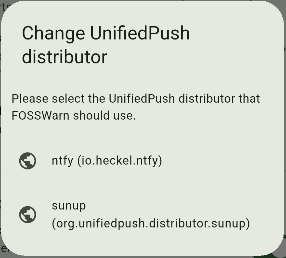
If you don't already selected a Push service, FOSSWarn will ask you which UnifiedPush distributor you would like to use. If you don't have any distributor installed on your system, please install one first.
If you want to change or refresh your push service / UnifiedPush distributor later, you can do that in settings -> Push service. When you select one, the configuration is refreshed and your subscriptions updated. Please wait until the process is finished.