Notification Self Check
Version
This feature has been added in version 1.0.1.
The notification self-check helps you to detect and solve issues with your push notification set-up. Navigate to the self-check with settings -> Notification Self Check.
Based on the user feedback, we are checking the most important aspects of your notification chain. If every field is green, you should be good to go, and you should be able to receive notifications.
Some of the checks failed. What does that mean, and what should I do?
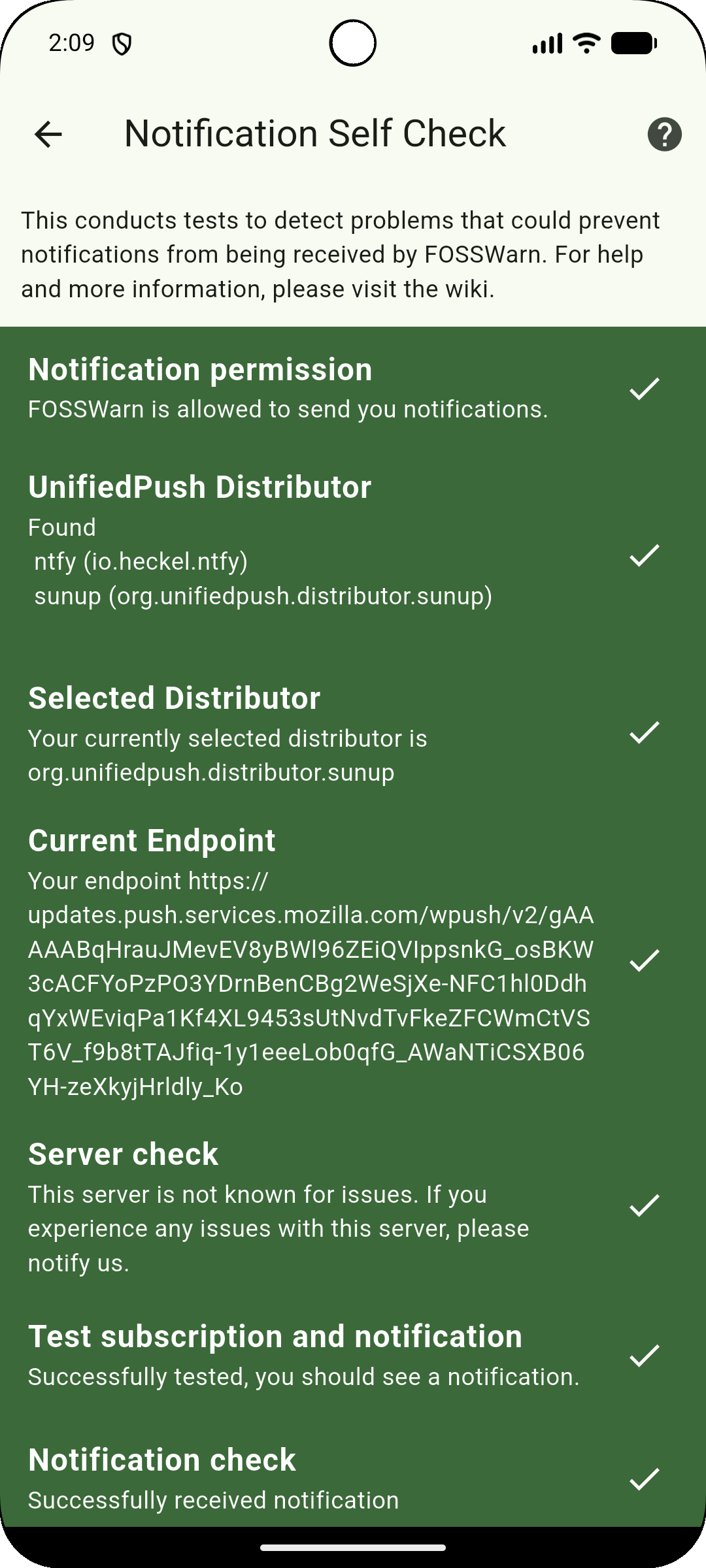
Notification permission
FOSSWarn needs your permission to send you notifications. If the check failed, you can press on the check tile, and FOSSWarn will again request the notification permission.
UnifiedPush Distributor
FOSSWarn uses UnifiedPush to send push notifications. For that, you need to install a unified push distributor on your device. More for information, see the this help page
Selected Distributor
If you installed a distributor and this check failed, go to the FOSSWarn settings, press on "Push Service", and select your distributor there.
Current Endpoint
This is the URL that is used by our server to send you notifications. As soon as you select a distributor, this check should also pass. If the check fails, please retry to select a distributor.
Server check
This checks if your selected server is known for issues. This check is mainly to avoid issues with the unchanged default server in the ntfy app. If this check fails with a message "This server has been unreliable in the past or has had other issues," you need to check your selected server in e.g., the ntfy app. Please read this help page for more information. If this check fails and you changed the push server, e.g., in the ntfy app, you have to refresh your push registration. To do this, go to the push service settings and select the service to use. This will refresh the push-registration, and the self-check should pass.
Currently, you will get the following check results:
- ntfy.sh: "This server has been unreliable in the past or has had other issues." This is due to their rate limit for push notifications. You can not use this server with the FOSS Public Alert Server
- unifiedpush.kde.org: "This server may be okay." This is due to some issues in the past with this server. You can use this server, but be aware that issues may occur again.
Test subscription and notification
This check tries to subscribe to the FOSS Public Alert Server to check if the server accepts your set-up and is able to send you push notifications. The subscription is after the check is removed again. If one of the previous checks failed, this check will also fail. As a result of this test, you should see a notification with "Successfully subscribed".
Notification check
This checks if the send notification from the test subscription actually arrives at the device. If this check failed but the subscription check passed, check if you disabled some notification channels (FOSSWarn settings -> open Android notification settings), or if the distributor app is battery optimized or is missing some permissions. If this check was also successful, the complete notification chain from our server to your device is working.